Car care & driving
How to Choose the Right Trip Computer
Autopapyrus
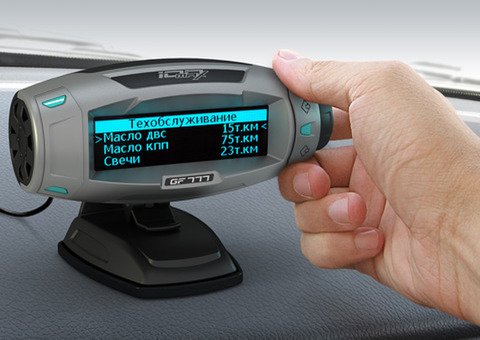
A trip computer (also called an on-board computer) is a device that gives the driver key information about the vehicle. It reads and displays all the essential data on its screen: fuel consumption, fuel level, interior and outside temperature, engine sensor status, major faults, and statistics such as speed, distance traveled, and fuel used. These devices are very useful for monitoring and managing your car.
There are two types of trip computers: universal and model-specific. A universal computer works with nearly any vehicle, from the simplest fuel-injected cars to more complex diesels. Model-specific computers fall short in that respect, since they only work with certain vehicles, but their features are broader and more varied. Universal units are also faster and easier to install. When choosing a trip computer, you need to consider your car's engine. Most computers are universal and designed for fuel-injected engines, but the most advanced ones are built for specific makes and take their technical features into account. These devices do more than diagnose faults; they also offer many additional features. However, if you only need a trip computer for diagnostics, it makes more sense to buy a universal one, which costs much less than a model-specific unit. When choosing a unit, pay special attention to whether it supports remote access or can be connected to a PC. This is needed to update the device's software. Choose a device with only the features you need, so you don't overpay for functions you will never use.
Route (trip) computers deserve a separate look. These devices report the main driving parameters, such as speed, fuel consumption, engine rpm, engine temperature, interior and outside temperature, electrical system voltage, and many others. A route computer monitors these parameters and alerts you if anything goes out of range. More expensive units offer a wider range of features. They can plan routes and calculate the optimal speed for each section of road, estimate the distance you can cover on the fuel remaining, create driving logs, report on the status of the monitored vehicle systems, show total mileage, control the air conditioner, radio and TV, connect to the Internet, work as a parking sensor display, and more. In short, route computers offer broad functionality that can meet the needs of almost any driver and make every trip more comfortable and safer. Your owner's manual and the manufacturer's documentation describe the features and specifications of various models in more detail, and they will help you pick the right unit. A good repair and maintenance manual for your vehicle also explains how to install one yourself.
There are two types of trip computers: universal and model-specific. A universal computer works with nearly any vehicle, from the simplest fuel-injected cars to more complex diesels. Model-specific computers fall short in that respect, since they only work with certain vehicles, but their features are broader and more varied. Universal units are also faster and easier to install. When choosing a trip computer, you need to consider your car's engine. Most computers are universal and designed for fuel-injected engines, but the most advanced ones are built for specific makes and take their technical features into account. These devices do more than diagnose faults; they also offer many additional features. However, if you only need a trip computer for diagnostics, it makes more sense to buy a universal one, which costs much less than a model-specific unit. When choosing a unit, pay special attention to whether it supports remote access or can be connected to a PC. This is needed to update the device's software. Choose a device with only the features you need, so you don't overpay for functions you will never use.
Route (trip) computers deserve a separate look. These devices report the main driving parameters, such as speed, fuel consumption, engine rpm, engine temperature, interior and outside temperature, electrical system voltage, and many others. A route computer monitors these parameters and alerts you if anything goes out of range. More expensive units offer a wider range of features. They can plan routes and calculate the optimal speed for each section of road, estimate the distance you can cover on the fuel remaining, create driving logs, report on the status of the monitored vehicle systems, show total mileage, control the air conditioner, radio and TV, connect to the Internet, work as a parking sensor display, and more. In short, route computers offer broad functionality that can meet the needs of almost any driver and make every trip more comfortable and safer. Your owner's manual and the manufacturer's documentation describe the features and specifications of various models in more detail, and they will help you pick the right unit. A good repair and maintenance manual for your vehicle also explains how to install one yourself.
What next